
FRUITFUL TIME
Free Productivity Tracking
For Microsoft Windows 7 and above
To improve your productivity you first need to learn where your time goes.
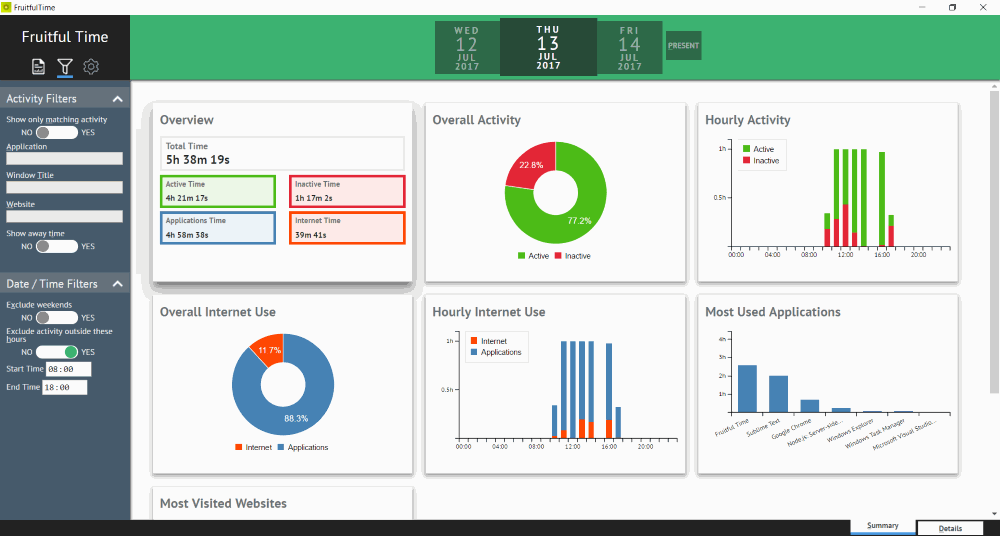
Fruitful Time helps you do just that by automatically tracking your activity and then giving you insight through a simple dashboard and powerful filtering options.
Filtering
Want to focus on a specific application or website? Fruitful Time makes that easy. Switch on activity filtering and type. Fruitful Time will update all reports on the fly.
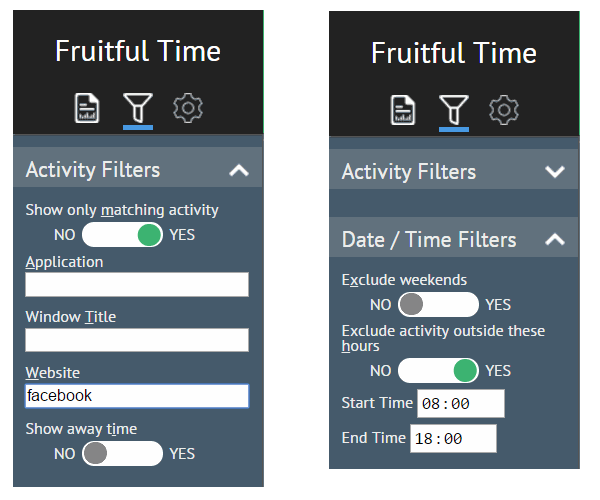
You can also exclude activity outside certain hours to, for example, focus on your work time.
Daily, Weekly, Monthly or Custom
All Fruitful Time reports can be generated for a day, a week or a month. You can also generate a custom period report to, for example, gain insight into the time spent while working on a particular project.
Exploring your activity reports is easy through the Fruitful Time navigation control.

Activity Details
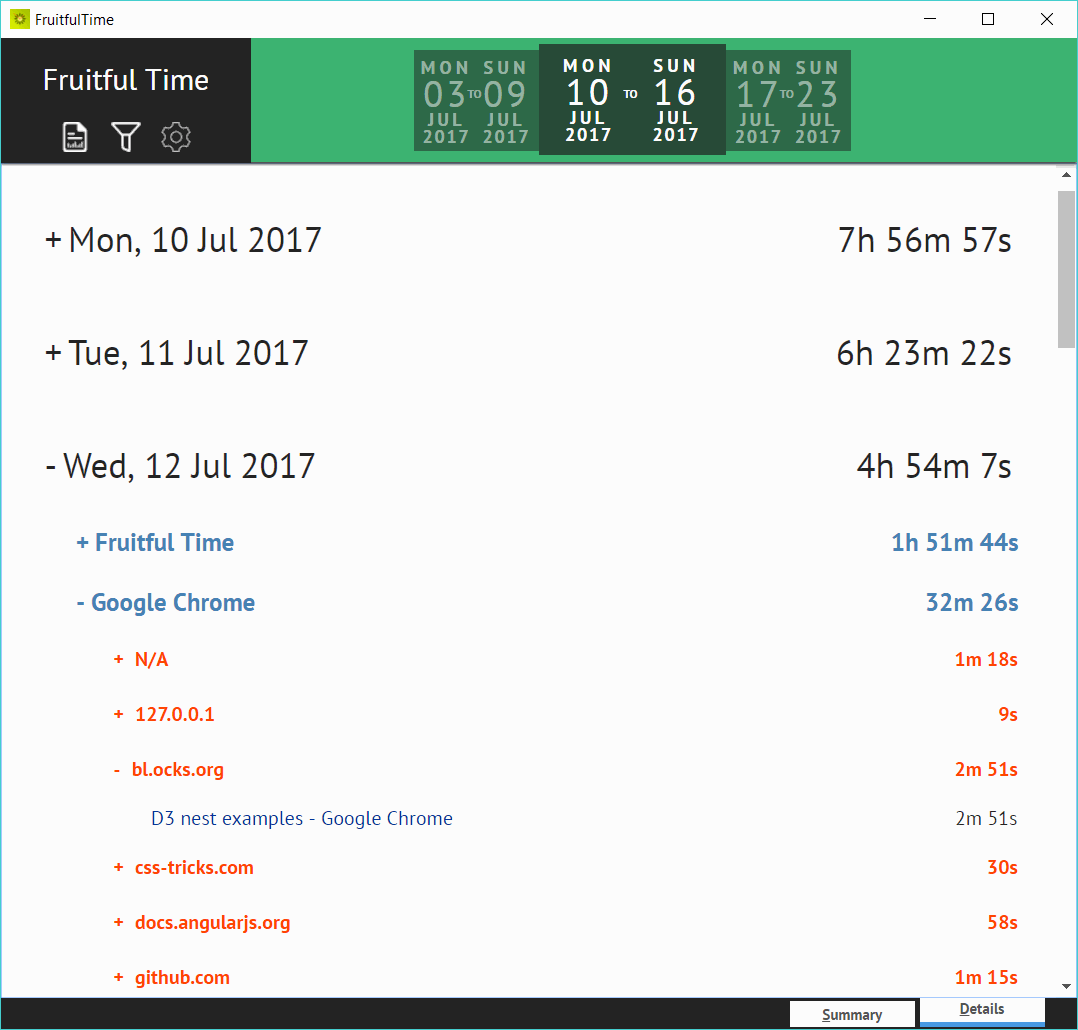
The dashboard gives you a good overview of how you used your time, but sometimes knowing that you spent two hours in Google Chrome is not enough. No worries. Hit the details tab in Fruitful Time to view a day by day report, grouping applications and domains where applicable.
Your Move
So why not take Fruitful Time for a spin and gain insight into how you spend your computer time.
Fruitful Time is available for free and your activity data stays on your computer.
Download
Normal Installation
Fruitful Time v1.1 64-bit
Fruitful Time v1.1 32-bit
Portable Installation
The portable installer can be used to install Fruitful Time on a USB flash drive. That way, you can carry Fruitful Time around with you and track your productivity wherever you are working.
Portable installations do not require administrative rights to install or use.
Fruitful Time v1.1 64-bit Portable
Fruitful Time v1.1 32-bit Portable
FAQ
Pricing
How much does Fruitful Time cost?
Fruitful Time is a free product, so you can download it and use it at no cost.
Is Fruitful Time a time-limited trial?
No, Fruitful Time has no time limit or feature restrictions.
Privacy
Is my activity data private?
Fruitful Time is a desktop application and does not share or upload any activity data. Furthermore, productivity tracking can be paused at any time.
Does Fruitful Time keep track of my web activity?
Yes, Fruitful Time keeps a record of all the website addresses you visit and the time you spend on them.
Note: All of the data, including websites visited, is stored on your computer and is never shared. Furthermore, you can pause activity monitoring at any time.
Does Fruitful Time log what I type?
No, Fruitful Time does not log what you type on your computer.
Does Fruitful Time take any screenshots while monitoring activity?
No, Fruitful Time does not take screenshots.
Requirements
What computer do I need to run Fruitful Time?
Fruitful Time works on Microsoft Windows 7 and above.
If you are using Microsoft Windows 7 or 8, you might also need to download the Microsoft .NET Framework 4.5.2 runtime, although most probably it is already installed on your computer.
Microsoft Windows 10 displays a warning. Is Fruitful Time safe?
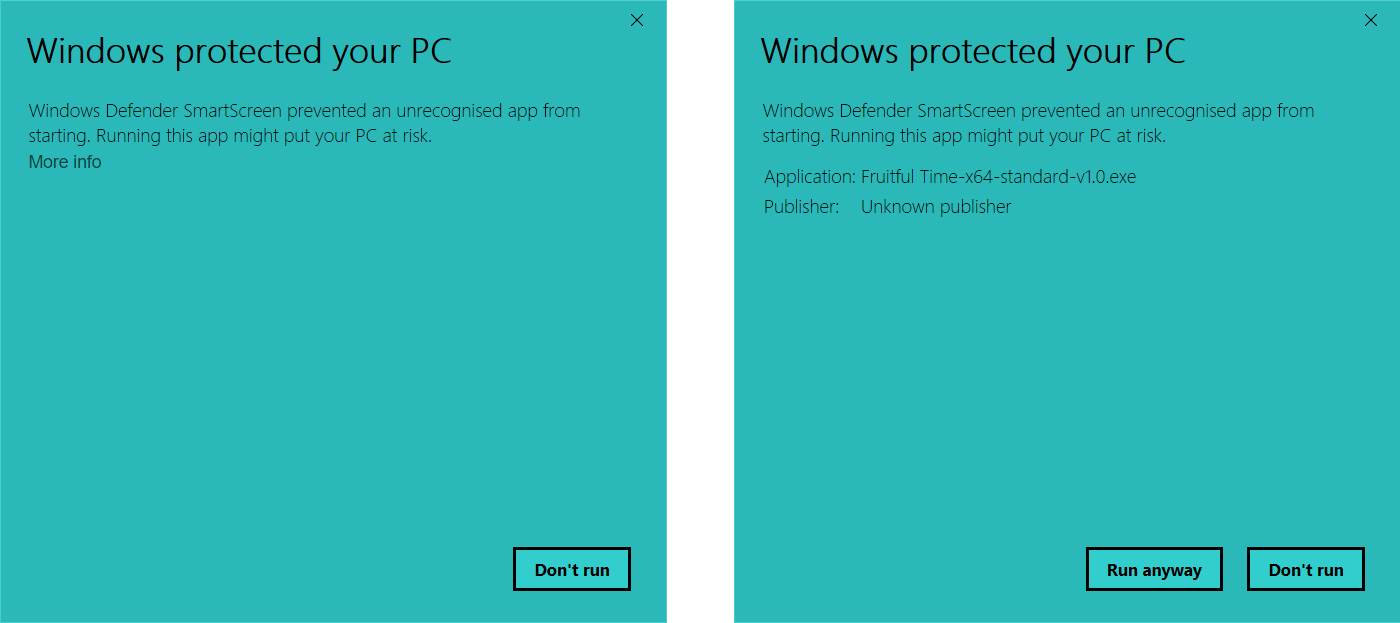
Microsoft Windows 10 displays the following warning because Fruitful Time is not digitally signed. Since Fruitful Time is available for free it is not sensible to pay an annual fee to a certification authority to digitally sign it.
To carry on with the installation of Fruitful Time you need to click on the more info link and then click Run anyway.
Which browsers does Fruitful Time support?
Fruitful Time can keep tabs on websites visited in all major web browsers, including Google Chrome, Mozilla Firefox, Microsoft Internet Explorer, Microsoft Edge and Opera.
Do I need to install web browser plug-ins or extensions to track websites visited?
No, Fruitful Time works with all major web browsers without installing any extra software.